Introduction to inventory management
Genebank collection management, more accurately referred to as inventory management, focuses on the careful handling and organization of plant genetic resources that are physically stored within a genebank. Although many genebanks prefer to use the terms "lot" or "sample" instead of "inventory", in GGCE the term "inventory" is consistently applied.
Handling and tracking plant material
When new plant physical material is introduced into the genebank, it may be divided and stored under various conditions, such as different temperatures or locations. Each GGCE Inventory item holds important data, including the item's storage location, the quantity on hand, and the parental lot from which it originated.
GGCE equips technicians with tools to update the database as they go about their routine genebank duties, ensuring each inventory item maintains an up-to-date status. With GGCE, your genebank can record data related to the acquisition of new material, storing, monitoring quantities, viability testing, regenerating, and ultimately distribution of material to germplasm requestors.
Accession passport data and inventory registration
Before entering inventory data, you must input some basic accession passport data into GGCE. Every inventory item in GGCE is linked to an existing accession through its accession number. Importantly, while complete passport information for an accession is not mandatory before entering inventory information, GGCE does require at least an acceptable species to be indicated. If the species has not yet been determined, GGCE uses Genus spp. for the taxon as a placeholder. For details on entering accession passport data, review the Accession documentation.
Once you have recorded basic accession passport data, you can register physical germplasm material as a new genebank inventory item, allowing for detailed tracking of the quantity and location of each item.
A useful way to understand the process is to liken a genebank to a library. The accessions are the book titles, but what resides on a library's shelves are the physical copies of the book – sometimes in different forms, such as hardbacks, softcovers, large print editions, and audio recordings. The library must first create an entry in its catalog for the title (similar to registering the accession passport data), then register each physical volume and indicate where it is stored. (Another commonality: genebanks and libraries receive requests for their stuff!)
Managing multiple lots and inventory records
Seed genebanks typically have multiple lots for a single accession, and each lot should always have its own inventory record. Every physical germplasm is assigned a unique identifier and is associated with an accession number, the parental inventory lot (if known), date of harvest, storage location, and other information – all of which can be entered into GGCE. Each inventory item listed in GGCE represents the germplasm in the collection, whether it is a jar or bag of seeds, seed packets, a plant in the field, or a set of sub-cultured in vitro germplasm.
Ideally, new inventory records are not created from scratch; instead, they typically result from regeneration, splitting out from an existing inventory, acquisition, etc.
Inventory management tasks and scheduling
Managing and maintaining a genebank’s germplasm inventory involves numerous tasks and processes. It is important for your genebank not to lose track of these tasks. GGCE is designed so you can easily schedule and monitor them. In GGCE, event actions can be scheduled and recorded, with quick retrieval options for checking their status. GGCE has filters to determine tasks that are ongoing, not yet started, completed, and so on.
GGCE is a very comprehensive database; your genebank should not need to maintain germplasm inventory data in any supplementary database. Most genebank tasks apply to the handling of physical germplasm plant material and GGCE was designed to facilitate these universal genebank activities.
Inventory activities
Many of the activities listed below are relevant to managing inventory items.
- Develop genebank inventory maintenance policies
- Develop consistent naming conventions in the genebank for inventory items; also develop meaningful names for storage locations
- Add inventory data into the genebank's database
- Use the Acquisition tool to register new material
- Create an inventory record; name the inventory correctly, following your genebank's naming conventions and GGCE's requirements
- Print labels and apply them to the inventory's container
- Enter sufficient location data so that the inventory can be located within the genebank
- Associate attachments (images, other file types) with their respective inventory items when the files exist
- Schedule processing/management tasks (inventory actions) to be completed:
- Count, weigh, place in storage, pull for planting, etc.
- Test for viability
- Split inventory
Inventory menu – for common inventory tasks
Selecting Inventory in the left menu displays GGCE's inventory management options. The menu options link to tasks and actions that are common for inventory.
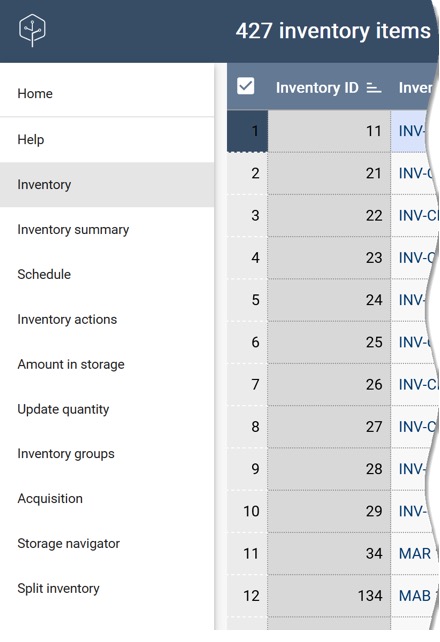
- Inventory – lists existing inventory items and allows for adding new inventory items
- Inventory summary – provides a graphical overview of the composition of inventory
- Schedule – shows the overview of genebank actions on germplasm for a specified time period
- Inventory actions – provides access to all inventory action records
- Amount in storage – lists the sum of quantity of material on hand and count of items for selected accessions
- Update quantity – can be used to quickly update the quantity on hand by scanning barcode labels
- Inventory groups – can be used to manage arbitrary groups of germplasm (i.e. subsets)
- Acquisition – enables registration of new incoming material (including their accession-level records) with GGCE
- Storage navigator – a feature for locating stored inventory (lots) by site or storage location
- Split inventory – provides a means to duplicate the data from an original inventory item so that multiple items are generated in the database with the quantities subdivided among the items
Inventory naming conventions
The Inventory Number is the unique identifier assigned by the genebank to an individual inventory lot.
In GGCE, the Inventory Number is constructed from four components: the Inventory Prefix, Number, Suffix, and Type. The concatenation of these four components represents the complete Inventory Number. Their combination must be unique in the database.

The fourth field, Inventory Type, is appended to the previous three values and the resulting string becomes the unique identifier of the inventory item. This last field indicates the form of germplasm: seed, plant, rhizome, in vitro, etc.
Similar to accession identifiers, you can generate the second field, the Inventory Number field, by entering a -1 in the field.
Is there an ideal naming convention? Yes: whatever works best for your genebank! Every genebank has its own considerations and typically develops genebank-specific naming conventions for its inventory lots.
One recommendation that all genebanks should consider is using the Sequence Number field, since GGCE has a feature to sequentially auto-number new inventory numbers. Note that the Inventory Prefix, Number, and Suffix do not need to match those used for the Accession (and frequently do not).
Some organizations adopt the year of multiplication as the Prefix for inventory items. They may also use Suffixes like "BASE" for seeds stored in the base collection and "ACTIVE" for those in the active collection. This is purely for convenience, as the Inventory Maintenance Policy provides more accurate classification for the management type.
System inventory records
Whenever an accession record is created in GGCE, a system inventory record is automatically generated. System inventory records always have type codes indicated with ** (two asterisks).
This software-generated inventory record does not represent physical inventory.
If the system inventory record doesn't actually represent physical germplasm, what is its purpose? The GGCE database has many interrelated tables, and records in other tables can either relate to a specific inventory item or to the accession in general. Since every accession has its own system inventory record, records that link to that system inventory record link to the accession in general. Records using physical inventory links, on the other hand, link to a specific inventory record representing a physical germplasm lot.
These system inventory records are essential and cannot be deleted, though they can be edited. It is best to avoid changing any system inventory data.
Storage naming conventions
Some genebanks may feel they need more than four storage location fields, but usually four is sufficient. If additional detail is necessary, two elements can be combined into a single field. For example, if a genebank has two storage rooms, "A" and "B," and uses similar naming conventions for the rows and shelves within, they could enter "A-4" in the Location Section 1 field – indicating room A, row 4.
An example:
| GGCE field | Used to indicate... | Genebank examples |
|---|---|---|
| Location Section 1 | Two storage rooms with twelve rows each | A(lpha) or B(eta), 1 through 12 |
| Location Section 2 | Five racks in a row | A through E |
| Location Section 3 | Four shelves in a rack (1 is the top shelf...) | 1 through 4 |
| Location Section 4 | Box number | # |
Review the storage system above. Could you find the germplasm samples (the inventory) if you were given a layout of their genebank's storage area?
Some genebanks may use shelf or row labels displaying starting and ending inventory numbers, but over time, this approach may not be practical and eventually require relabeling the shelving or reorganizing the germplasm. For durability, it is advisable to develop a naming convention for shelving that is independent of the inventory items stored on the shelves, assigning permanent addresses such as Row A-1, Rack C, Shelf 1, Box 5.