Using GRIN Taxonomy
GRIN Taxonomy focuses on economically important plants from around the world and is actively maintained by USDA taxonomists. We recommend aligning with GRIN Taxonomy instead of curating your own taxonomic database.
When registering accessions, the Taxon field is required. Do not type a taxon directly; select it from the list of available names.
You may contact USDA taxonomists if you need to include or vet additional taxonomy names in the database.
New databases do not come with a taxonomic database pre-installed. When pre-existing GRIN-Global databases are converted, their taxonomy data is likely out of date. Because updates to GRIN Taxonomy are released periodically, refresh your copy on a regular basis.
This document explains how to keep your database synchronized with GRIN Taxonomy.
Why use GRIN Taxonomy?
USDA’s GRIN Taxonomy focuses on economically important plants from around the world. Economic uses, common names, and native distributions are included for many species. Though the emphasis is on major, minor, or potential crops and their wild and weedy relatives, many other categories of plants are represented including ornamentals and some rare and endangered plants.
Included in the GRIN Taxonomy are scientific names for 29,000+ genera (16,000+ are accepted names) and 134,000+ species with common names, geographical distributions, literature references, and economic importance.
Generally recognized standards for abbreviating authors' names and botanical literature have been adopted. The scientific names are verified, in accordance with the international rules of botanical nomenclature, by taxonomists of the USDA National Germplasm Resources Laboratory using available taxonomic literature and consultations with taxonomic specialists. GRIN also provides the description of abbreviations and symbols used within the taxonomic data.
The GRIN Taxonomy database includes the names that are used by the majority of crop genebanks, and is the preferred source of names.
Loading the GRIN Taxonomy database
We recommend that the taxonomic database is refreshed every few months, or as needed:
- Log in to the server,
- Open Administration pages to manage your instance,
- In the USDA GRIN data section, click Update GRIN Taxonomy,
- The update procedure takes quite some time to complete, so please be patient.
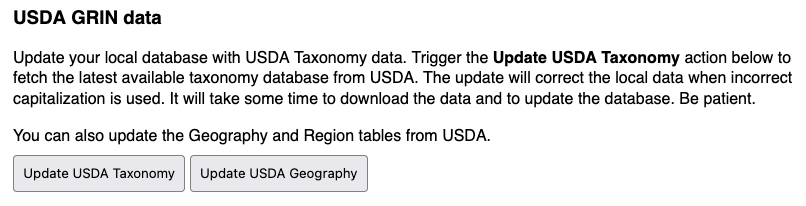
The server will download the most recent available copy of the GRIN Taxonomy database. If this is the first install of GRIN Taxonomy, all records will be imported to the local database, making them available for use. On subsequent runs, the names that were previously imported from GRIN will be updated accordingly, keeping them in sync with changes made by USDA taxonomists.
Any records that were added to the local taxonomic database may be updated to match their curated counterparts in GRIN Taxonomy.
It is possible, although unlikely, that species name records will be fundamentally modified (that is, describe a completely different species). The system keeps track of modifications to taxonomic records, and you may review them in the Audit Logs section.
Registering taxonomic names
Although GRIN Taxonomy provides a comprehensive starting set, genebanks sometimes need to record local or newly described names that are not yet in the USDA database. You can register family, genus, and species records directly in the application. Taxon records that you add are kept in the local database and are not overwritten when GRIN Taxonomy is refreshed, unless USDA later publishes an entry with the same identifiers.
Open the Taxonomy section from the main navigation to browse and manage names. The section is divided into three pages: Family, Genus, and Species. Each page lists existing records and provides an Add button to create new ones. Select an existing row and click Edit to change a record. Family names are shown in the genus and species views, making it easy to see which family a taxon belongs to.
Registering a family name
On the Family page, click Add to open the family form. At a minimum, enter the Family name. You can also provide the Family authority, and, when relevant, Subfamily name, Tribe name, Subtribe name and Alternate name.
If the family is part of a larger named group (for example, a clade above the family rank), use the Suprafamily rank fields. To link the new family to an accepted (current) family record or to a type genus, use the corresponding lookup fields. A GRIN ID can be stored when the family already exists in GRIN Taxonomy, making future updates easier. Add any internal notes and click Save.
Registering a genus
On the Genus page, click Add to open the genus form. A genus must be linked to a family, so select the Family first. The Genus name is required, and you can add the Genus authority and optional subdivisions such as Subgenus name, Section name, Subsection name, Series name and Subseries name.
Use the Current genus field to point the new genus to the accepted genus when the one you are registering is a synonym. Set Web visible to control whether the genus name is exposed to external users. Save the form when finished.
Registering a species
On the Species page, click Add to open the species form. A species must be linked to a genus, so select the Genus first. The Species name is required; enter the Species authority when you have it.
Use the additional fields to record infraspecific ranks and authorities:
- Subspecies name and Subspecies authority
- Variety name and Variety authority
- Subvariety name and Subvariety authority
Mark the Specific hybrid, Subspecific hybrid or Varietal hybrid switches when the name represents a hybrid at the corresponding rank. Use the Current species field to link a synonym to its accepted species.
You can also record curation details such as the Nomen number, Name verified date, Verifier cooperator, Curator cooperators, Priority sites and a Site note. These are useful for tracking which curator or site maintains the accepted name.
Each species record stores a computed Name field. The value is assembled automatically when the record is saved, unless you enter it manually.
The generated name starts with the linked Genus name, followed by a space, or by x when the Specific hybrid switch is enabled. The Species name is then appended.
If any infraspecific ranks are filled in, they are added after the species name, prefixed with their rank label:
subsp.for a subspecies, ornothosubsp.when the Subspecific hybrid switch is enabledvar.for a varietysubvar.for a subvariety- the configured forma rank type and name for a forma
Likewise, the Name authority field is filled automatically when it is left blank. It starts with the Species authority, but is replaced by the authority of the lowest infraspecific rank that has a value, checking subspecies, variety, subvariety and forma in that order.
If you need a name that does not follow this convention, you can override the Name and Name authority fields directly and the automatic build is skipped for those fields.
Using the species autocomplete
When you register a new accession or edit an existing one, the Taxon field is required. As you type, the autocomplete searches the species database. If you leave the field blank and open the dropdown, the system suggests the most commonly used species first, helping you pick frequently recorded taxa quickly. Type at least a few letters to narrow the list to a specific genus or species.